The best camera is the one you have with you, and for most of us, that's a phone. Modern smartphones can take stunning photos, but only if you know how to use them. In this guide, I'll share practical tips for taking better photos with your phone: getting the basics right, working with light, composition, the camera features worth using, editing and the accessories that actually help.
Phones have real advantages over big cameras. They're always with you, people relax in front of them, and computational photography combines several frames into one great shot in a fraction of a second. Their limits, like small sensors and fixed lenses, push you to think about light and composition, and that's exactly what makes photos better.
Get the basics right
These four habits fix most disappointing phone photos:
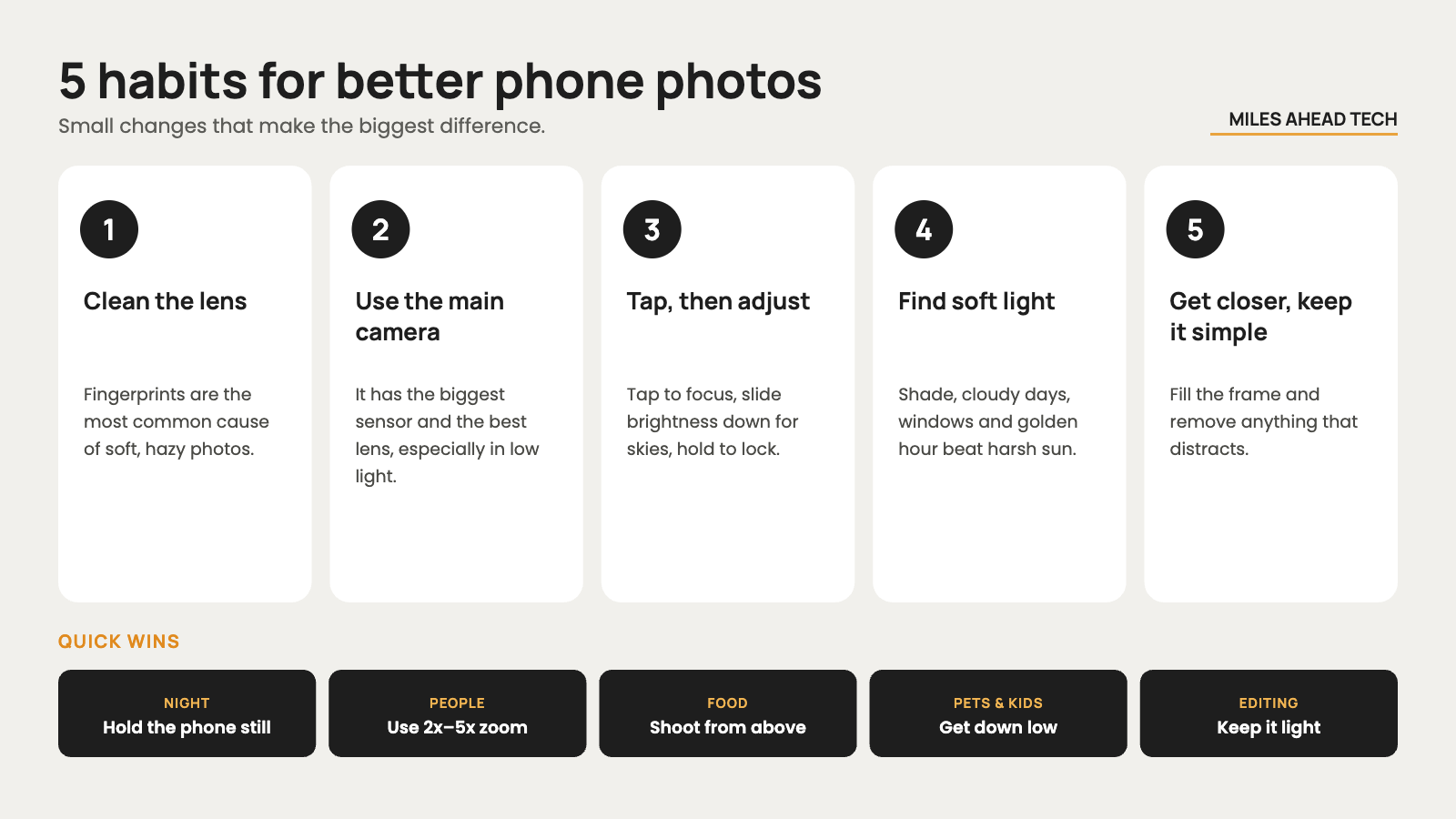
Clean the lens before you shoot. A fingerprint is the most common reason for soft, hazy photos. Wipe the lenses with a soft cloth or the inside of a cotton shirt.
Start with the main camera. It has the biggest sensor and the best lens. Use the ultra-wide and telephoto cameras when the shot really needs them, especially in low light.
Tap to focus, then adjust exposure. Tap your subject, then slide the brightness control up or down. Press and hold to lock focus and exposure when you want to recompose.
Hold the phone steady. Use both hands, tuck your elbows in and press the shutter gently, or use the volume button.
Work with light, not against it
Light matters more than the phone you use. Soft light, like on a cloudy day, in the shade or by a window, is flattering for people and food. The hour after sunrise and before sunset, often called golden hour, gives warm colors and long shadows. Harsh midday sun creates dark shadows under eyes and blown-out skies, so move your subject into the shade or turn them so the sun is behind them.
Night mode is impressive, but it works best when you help it. Hold the phone as still as possible or lean it against something, and ask people to stay still during the capture. For moving people at night, find a brighter spot or turn off night mode to get a faster shutter speed. Avoid the flash in most situations, as it makes faces flat and backgrounds dark.
Composition tips that make a big difference
Simplify the frame. Decide what the photo is about and remove everything that distracts from it, by moving closer, changing your angle or cropping later. Then try these classic techniques:
Leading lines: roads, fences and rivers guide the eye toward your subject.
Symmetry and reflections: buildings, water and windows create striking, balanced shots.
Natural framing: doorways, branches or windows frame your subject.
Negative space: lots of empty sky or wall makes a small subject stand out.
Layers: something in the foreground, middle and background adds depth.
Change your height and angle. Most phone photos are taken at eye level while standing. Crouch down for pets and kids, shoot from above for food, and get closer than feels natural. Turning on the grid in the camera settings helps you keep horizons straight and place your subject off-center.
Camera features worth using
Burst and Live Photos: hold the shutter or use Live Photos and Motion Photos for moving subjects, then pick the sharpest frame.
The right file format: HEIF or high-efficiency JPEG saves space and is fine for everyday shots. RAW or ProRAW keeps more detail for editing, but files are much bigger.
Portrait mode: treat the background blur as an effect you can adjust. Check edges around hair and glasses, and lower the blur strength in the editor if it looks fake.
Telephoto for people: a 2x to 5x zoom gives more flattering faces than the ultra-wide camera up close.
Pro or manual mode: useful for night shots, long exposures and locking settings, but auto mode is excellent for most situations.
If you're thinking about upgrading, the camera system is one of the biggest differences between models. Our guide on which iPhone to buy and our Xiaomi 18 Pro coverage explain what each camera offers.
How to edit phone photos
Edit with restraint. Start with the basics: straighten and crop, adjust exposure and contrast, then fine-tune warmth and saturation. Small changes usually look better than heavy filters. The built-in editor in Photos or Google Photos is enough for most people, and apps like Lightroom Mobile or Snapseed give you more control.
Always keep the original. Most editors are non-destructive, but if you use an app that saves a copy, keep the untouched version too. Be careful with AI tools that remove objects or add detail: they're great for small fixes, but they can make photos look unnatural. Finally, make sure your photos are backed up. Our guide on where to store your phone photos compares the best options.
A simple workflow ties it all together:
Clean the lens and check the light.
Shoot a safe version first.
Make variations by changing the angle, distance or lens.
Pick the best shot and delete the rest.
Edit lightly and back up your library.
Accessories that actually help
Compact tripod with a phone clamp: for night photos, group shots, long exposures and timelapses. The Ulanzi MT-44 is a tripod and selfie stick in one.
Bluetooth remote or smartwatch: take photos without touching the phone and causing shake.
Gimbal: mainly for smooth video, like the DJI Osmo Mobile 8, but it also helps with panoramas and timelapses.
Small LED light: great for food, products and portraits indoors.
Power bank and extra storage: for long days of shooting and big RAW files.
Skip cheap clip-on lenses. They usually reduce sharpness, and modern phones already have good ultra-wide and telephoto cameras.
Common problems and quick fixes
| Problem | What to try |
|---|---|
| Soft or hazy image | Clean the lens, tap to focus and switch back to the main camera. |
| Blurry people at night | Ask them to stay still, find more light or turn off night mode for a faster shutter. |
| White sky with no detail | Lower the exposure slider, use HDR or change your angle. |
| Unnatural HDR or AI detail | Turn down scene enhancement, shoot RAW or edit more gently. |
| Portrait mode cut-out errors | Lower the blur strength, move farther from the background or switch to the telephoto camera. |
| Colors change after sharing | Share the original file instead of a compressed copy, and check HDR display settings. |
Final thoughts
Better phone photos don't depend on buying the newest phone. Clean the lens, find good light, simplify the composition and get closer. Learn a few camera features like exposure lock, burst and portrait mode, edit with a light touch and back up everything. Practice these habits for a few weeks and you'll see a big difference in your photos.
